What Is?

Bluetooth is a short-range wireless communication technology that allows electronic devices to exchange data without the
need for cables.
It operates on the 2.4 GHz radio frequency band and is widely used in devices such as smartphones, laptops, headphones, speakers,
keyboards, and smartwatches.
Originally developed in 1994 by Ericsson, Bluetooth has evolved through multiple versions, each offering improvements in speed, range,
and energy efficiency.
Modern versions like Bluetooth Low Energy (BLE) are designed for devices that need to operate with minimal power consumption, making it
ideal for IoT and wearable technology.
Bluetooth Versions
| Year | LMP (Link Manager Protocol) |
Version |
Radio Frequency |
|
|---|---|---|---|---|
| Major | Minor | |||
| 2025-11 | 6 | 6.2 | 2.4 GHz | |
| 2025-05 | 6.1 | |||
| 2024-08 | LMP 14 | 6.0 | ||
| 2023-02 | LMP 13 | 5 | 5.4 | |
| 2021-07 | LMP 12 | 5.3 | ||
| 2019-12 | LMP 11 | 5.2 | ||
| 2019-01 | LMP 10 | 5.1 | ||
| 2016-12 | LMP 9 | 5.0 | ||
| 2014-12 | LMP 8 | 4 | 4.2 | |
| 2013-12 | LMP 7 | 4.1 | ||
| 2010-06 | LMP 6 | 4.0 | ||
| 2009-04 | LMP 5 | 3 | 3.0 + HS | |
| 2007-07 | LMP 4 | 2 | 2.1 + EDR | |
| 2005 | LMP 3 | 2.0 + EDR | ||
| LMP 2 | 1 | 1.2 | ||
| 2002 | LMP 1 | 1.1 | ||
| LMP 0 | 1.0b | |||
What is the Bluetooth Version of my Computer?
Windows 11
-
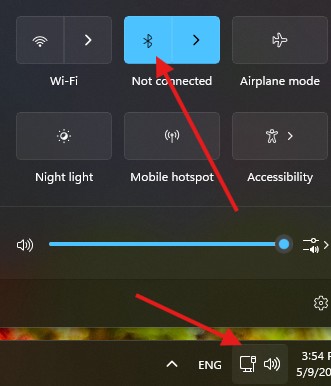
First, to find out your Bluetooth Version, you need to turn on the Bluetooth Device from the section in the bottom right corner of the
screen,
as you can see in the screenshot below.
-
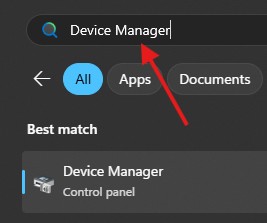
Press
Windows key
+ S, type Device Manager, and open it.
-
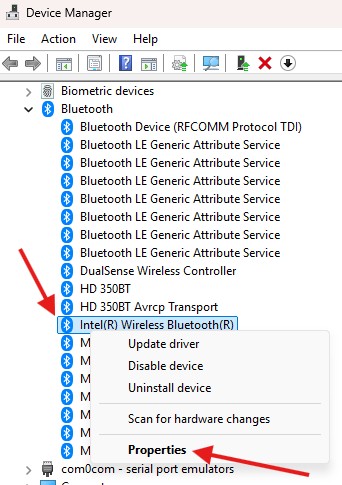
Locate the Intel(R) Wireless Bluetooth(R) line under Bluetooth, and open it using Right Click > Properties.
-
Open the
Advanced
tab and you will see the LMP number next to Firmware Version.
You can use this number to find your Bluetooth device's version by looking at the Bluetooth Versions table above.
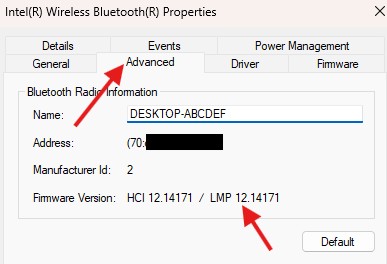
(For example, the Bluetooth version for LMP 12.14171 is 5.3)